Change Sound Volume for Benz Door Opening & Closing on W212
The Mercedes-Benz W212 E-Class features several electronic systems that control vehicle access, security, and acoustic feedback. One interesting customization option is adjusting the sound volume when opening and closing the doors.
For owners who want to personalize this feature, Mercedes-Benz diagnostic and coding software can provide access to relevant vehicle parameters. The adjustment is associated with the SAMR_212 (Rear Signal Acquisition and Actuation Module) on supported configurations.
This guide explains how the door opening and closing sound works, which module is involved, how DTS Monaco is used for coding, and what technicians should consider before changing the configuration.
1. What Is the Door Opening & Closing Sound on Mercedes W212?
The door opening and closing sound is an acoustic signal generated by the vehicle's electronic system. Depending on the vehicle configuration, it can provide audible feedback during certain locking or unlocking operations.
On the Mercedes-Benz W212, this feature is associated with the vehicle's anti-theft and acoustic signaling system.
The sound volume may be configurable through diagnostic coding on vehicles with the appropriate factory-installed equipment.
Important distinction:
There are two functions that should not be confused:
-
Acoustic Lock Confirmation: An audible signal confirming that the vehicle has been locked or unlocked.
-
Door Opening & Closing Sound: The acoustic feedback function whose parameters may be configurable through the relevant vehicle control module.
These functions may have different control parameters and configurations. Changing the Acoustic Lock setting in the instrument cluster does not necessarily adjust the volume of the door-related sound.
The availability of each function depends on the vehicle's equipment and production configuration.
2. Which Control Module Manages the Door Sound on W212?
The relevant control module for this coding procedure is SAMR_212.
SAMR_212 is associated with rear signal acquisition and actuation functions. Depending on the vehicle configuration, it can contain parameters related to acoustic signaling.
When working with Mercedes-Benz W212 coding, technicians need to identify the correct module before modifying any settings.
The coding procedure discussed in this guide involves two parameter areas:
-
Buzzer Parameter: Related to the configurable buzzer sound level.
-
Parameter VTA Country: A configuration area associated with country-specific settings.
Both parameter areas are referenced in the documented DTS Monaco coding procedure for this feature.
However, the available parameters and their effects should be verified against the specific vehicle configuration.
3. What Tools Are Required?
To perform this coding task, technicians need compatible diagnostic equipment and software.
The main requirements include:
1. Mercedes-Benz DTS Monaco
DTS Monaco is a diagnostic and engineering software environment used for accessing and configuring supported vehicle control modules.
For W212 coding, it can be used to communicate with SAMR_212 and inspect the available parameter domains.
2. Compatible Vehicle Communication Interface
A suitable vehicle communication interface (VCI) is required to establish communication between the computer and the vehicle.
Compatibility depends on the vehicle's electronic architecture and the diagnostic setup.
3. Stable Power Supply
Maintaining stable vehicle voltage is important during diagnostic and coding operations.
Unexpected voltage drops or communication interruptions may affect the coding process.
4. Original Vehicle Configuration Information
Before changing any parameter, technicians should identify the vehicle's equipment and record the original configuration.
This information is useful when checking results or restoring the previous settings.
4. How to Change Sound Volume for Benz Door Opening & Closing on W212
To change the sound volume on a Mercedes-Benz W212, use DTS Monaco to access the SAMR_212 ECU through Variant Coding.
The procedure consists of two coding operations:
-
Adjust the Buzzer Parameter.
-
Configure the Parameter VTA Country.
Step 1: Open Variant Coding in DTS Monaco
Launch DTS Monaco and open the Variant Coding function.
This is the coding mode used to access the vehicle's ECU configuration.
Step 2: Connect to the SAMR_212 ECU
Search for the ECU named SAMR_212 in the ECU selection field.
Select the corresponding ECU and click Connect.
Make sure the connection is established before continuing.
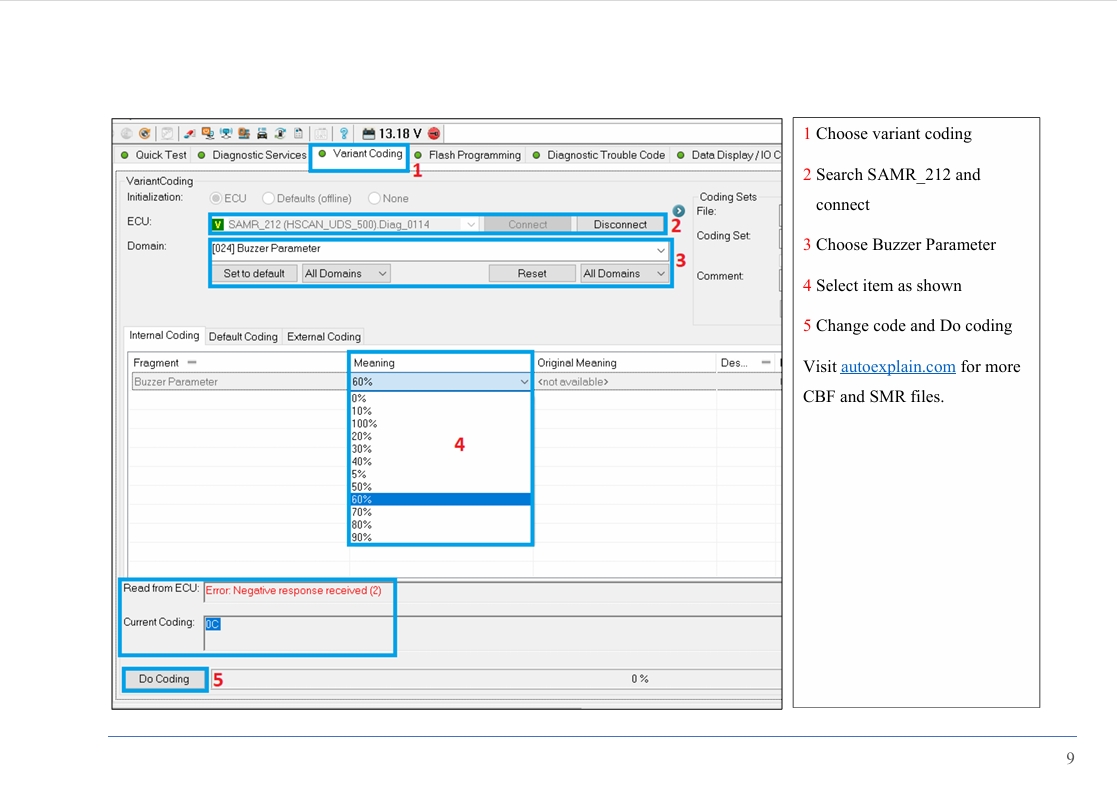
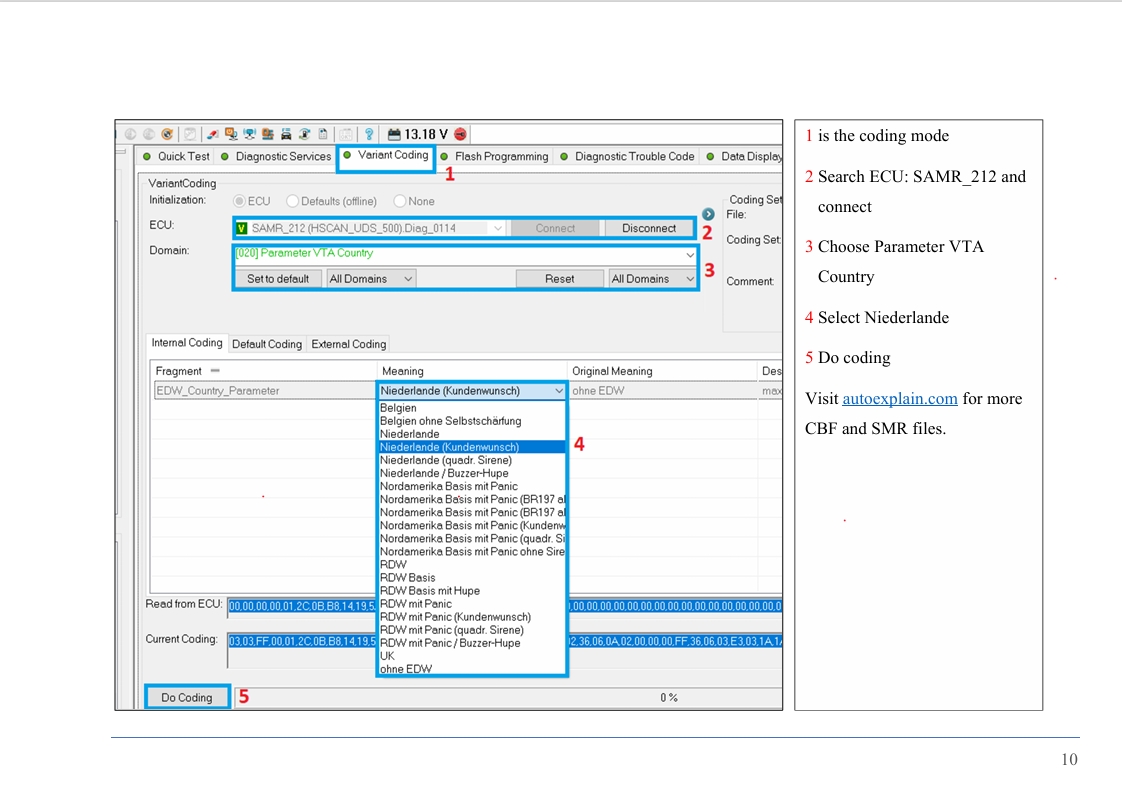
Image extracted from the book "Mercedes DTS Monaco Advanced Manual [AI Assistant]"
Step 3: Select Buzzer Parameter
Open the Domain dropdown menu.
Select:
[002] Buzzer Parameter
This parameter domain provides access to the configurable buzzer sound level.
Step 4: Select the Desired Sound Level
Locate the Buzzer Parameter fragment in the Internal Coding section.
Open the Meaning dropdown menu to display the available percentage values.
Select the desired value according to the intended sound configuration.
The available options shown in the reference include percentage-based settings.
The original value should be recorded before making any changes.
Step 5: Execute Do Coding
After selecting the desired Buzzer Parameter value, click Do Coding.
Allow DTS Monaco to complete the coding operation.
Check the ECU response and confirm whether the new configuration has been accepted.
Step 6: Select Parameter VTA Country
Return to the Domain dropdown menu.
Select:
[000] Parameter VTA Country
This opens the country-related configuration parameter.
Step 7: Select Niederlande
Locate the EDW_Country_Parameter fragment.
Open the Meaning dropdown menu.
Select the Niederlande configuration shown in the reference.
The screenshot shows the option Niederlande (Kundenwunsch) selected.
Use the appropriate value only when it matches the vehicle's intended factory configuration and applicable regional requirements.
Step 8: Execute Do Coding Again
After selecting the appropriate country parameter, click Do Coding.
Wait for the operation to finish.
Check the ECU response and verify that the configuration has been accepted.
Step 9: Verify the Sound Function
After completing both coding operations:
-
Check the SAMR_212 communication status.
-
Read the ECU configuration again.
-
Check for diagnostic fault codes.
-
Test the relevant acoustic function under suitable conditions.
The actual result depends on the vehicle's equipment, software version, and original configuration.
Important: The two coding operations should not be treated as interchangeable. Buzzer Parameter adjusts the configurable sound-level value, while Parameter VTA Country selects a country-related configuration.
5. Important Conditions Before Coding
Not every Mercedes-Benz W212 supports the same acoustic configuration.
The documented coding method specifies an important condition: the original anti-theft system must be installed.
Other factors can also affect the availability of the function.
Vehicle Production Year
The W212 was produced across multiple model years.
Electronic module versions and available parameters may differ between production periods.
Factory Equipment
The presence of the original anti-theft system is an important prerequisite for the documented procedure.
Vehicles with different equipment configurations may not expose the same parameters.
Regional Configuration
Mercedes-Benz uses different vehicle configurations for different markets.
Country-specific settings can affect certain acoustic functions.
Technicians should preserve compliance with the vehicle's applicable regional requirements.
Control Module Compatibility
The SAMR_212 module must be identified correctly.
A parameter found on one vehicle should not automatically be considered compatible with another vehicle.
6. Common Problems During W212 Door Sound Coding
Coding may not always produce the expected result. Several factors should be considered when troubleshooting.
The Buzzer Parameter Is Not Available
Possible reasons include:
-
The vehicle has a different equipment configuration.
-
The installed module uses a different software version.
-
The selected diagnostic configuration does not match the vehicle.
-
The original anti-theft system is not installed.
The first step is to verify the vehicle identification and module configuration.
The Sound Volume Does Not Change
If the acoustic output remains unchanged, check whether the modified parameter actually controls the intended function.
Also verify that the coding operation was completed successfully.
Do not assume that the Buzzer Parameter controls every audible signal produced by the vehicle.
The Acoustic Function Is Not Available
Some vehicles may not support the function because of their original equipment or regional configuration.
In this situation, technicians should verify the factory specification before considering further modifications.
Diagnostic Fault Codes Appear
Unexpected fault codes after coding may indicate a configuration or communication issue.
Read and document the fault codes before attempting additional changes.
Avoid clearing faults without understanding their causes.
7. Acoustic Lock Confirmation vs. Door Sound Volume Adjustment
Understanding the difference between these two functions helps prevent incorrect coding.
| Feature | Acoustic Lock Confirmation | Door Sound Volume Adjustment |
|---|---|---|
| Main purpose | Confirms locking or unlocking | Adjusts supported acoustic output |
| Typical access | Instrument cluster settings | Diagnostic coding |
| Relevant system | Acoustic Lock function | SAMR_212 on supported vehicles |
| Adjustment | Enable or disable | Parameter configuration |
| Main consideration | Vehicle production specification | Equipment and module compatibility |
According to the Mercedes-Benz W212 owner's manual, the Acoustic Lock function can be activated or deactivated through the instrument cluster.
The audible confirmation behavior may vary depending on the vehicle's production date. Some versions provide a signal when locking, while others can provide signals during both locking and unlocking.
This is different from changing the configurable buzzer volume through diagnostic coding.
8. Why Accurate Mercedes-Benz Coding Knowledge Matters
Mercedes-Benz electronic systems contain multiple control modules and interconnected functions.
A coding change in one module can affect the behavior of a particular feature. Therefore, technicians need to understand the relationship between the module, parameter domain, and vehicle equipment.
For W212 coding, important technical knowledge includes:
-
Understanding Mercedes-Benz control module architecture.
-
Identifying the correct diagnostic module.
-
Recognizing parameter domains and their purposes.
-
Checking vehicle-specific coding compatibility.
-
Recording original configurations.
-
Verifying results after coding.
DTS Monaco provides access to engineering-level diagnostic functions, but using the software effectively requires an understanding of Mercedes-Benz electronic systems.
9. Learn Mercedes-Benz Coding with Axdemy
Working with Mercedes-Benz diagnostic and coding systems requires more than knowing where to find a parameter.
Technicians need structured technical knowledge to understand control modules, coding functions, vehicle configurations, and diagnostic procedures.
Axdemy provides online technical Ebook learning resources for automotive professionals and enthusiasts.
The learning platform covers technical topics across several vehicle manufacturers, including:
-
Mercedes-Benz diagnostic and coding.
-
BMW diagnostic and programming.
-
VAG vehicles, including Audi and Volkswagen.
-
Jaguar Land Rover (JLR).
-
General Motors (GM).
-
ECU programming, WinOLS, and PCB-related technical knowledge.
Axdemy Ebooks are designed for online learning through the website rather than conventional PDF downloads.
The platform also integrates an intelligent AI question-and-answer system. Learners can use it to explore technical concepts and clarify questions during their learning process.
For technicians interested in Mercedes-Benz coding, structured learning can help build a better understanding of vehicle electronics and diagnostic workflows.
Explore the technical learning resources at Axdemy at: https://axdemy.net/library
Conclusion
Changing the sound volume for Benz door opening and closing on W212 involves understanding the vehicle's acoustic system and its control module configuration.
The documented coding approach uses DTS Monaco to access SAMR_212, particularly the Buzzer Parameter and Parameter VTA Country domains. However, the procedure is subject to factory equipment, module compatibility, and regional configuration.
Before performing any modification, verify the original vehicle specification and preserve the existing coding data.
For further Mercedes-Benz diagnostic and coding knowledge, visit Axdemy.net and explore its online technical Ebook resources.